Ask most small business owners who is in charge of cybersecurity and you will hear “my IT guy,” “my nephew set up the Wi-Fi,” or an honest shrug. That’s understandable. You have customers to serve, payroll to run, and a hundred other fires to put out. But after years of cleaning up infected PCs and locked-up networks across the Inland Empire, I can tell you the businesses that stay safe have one thing in common: the owner treats security as a leadership job, not a tech chore. Good cybersecurity for business owners doesn’t mean learning to configure a firewall. It means asking the right questions, setting clear expectations, and making a few decisions that only the person in charge can make.
Here’s a practical, plain-English playbook for owners and managers in Murrieta, Temecula, Menifee, and the surrounding area, and for anyone running a household that depends on its computers.
Technology people can install tools, but they can’t decide what the business is willing to risk. Only the owner can say, “We cannot be down for more than a day,” or “Customer records must never leave this office unencrypted.” Without that direction, security work turns into a pile of random purchases that never add up to protection. Employees also take their cue from the boss. If the owner shares passwords, skips updates, and clicks “remind me later” on every prompt, the team will do the same.
There’s a business upside, too. More and more customers, vendors, and insurance carriers ask about your security before they sign. Larger clients send questionnaires. Cyber insurance applications ask whether you use multi-factor authentication and tested backups. A business that can answer “yes” confidently wins work that a competitor without answers simply loses. Security isn’t only a cost; done right, it’s a selling point.
You don’t need technical vocabulary to lead. You need good questions and the willingness to follow up until the answers are clear. Start with these:
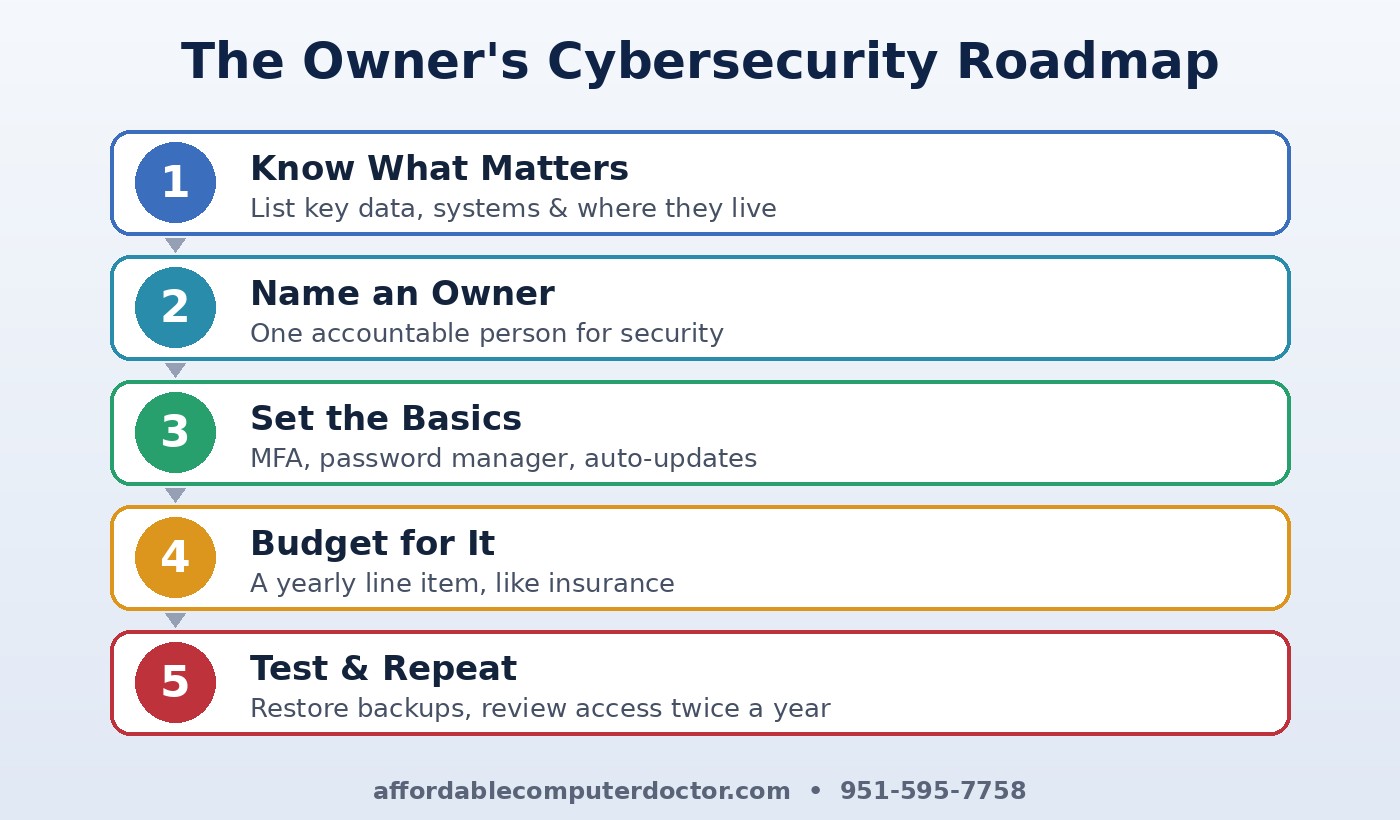
Someone has to be accountable, even in a five-person office. It might be you, an office manager, or an outside provider, but write the name down. That person tracks updates, keeps the list of accounts, and brings problems to your attention before they become emergencies.
Put a short policy in writing: unique passwords stored in a password manager, multi-factor authentication on every account that offers it, automatic updates on all computers and phones, and no company data on personal USB drives. Keep it to one page. Policies nobody reads protect nobody.
Owners often ask me, “What’s the ROI on cybersecurity?” Think of it the way you think about liability coverage. Compare a modest monthly spend on backups, endpoint protection, and monitoring against the cost of a week of downtime, a wire-fraud loss, or notifying every customer that their data was exposed. For most small businesses, a single incident costs more than years of prevention. Set a yearly line item so security isn’t fighting for leftovers.
Most attacks start with a person, not a machine: a fake invoice, a “your mailbox is full” link, a phone call pretending to be the bank. Spend fifteen minutes a month talking through a real scam example. Make it safe for employees to report a mistake quickly. The worst breaches I’ve seen grew because someone was too embarrassed to say, “I think I clicked something.”
Twice a year, restore a file from backup and time how long it takes. Walk through what you’d do if email were hacked. Review who still has access to your systems. These short check-ins turn security from a one-time project into a habit, and they give you real answers when a customer or insurer asks.
Families have a “CEO” too: whoever pays the bills and manages the accounts. The same principles apply at home. Know where your important files and photos live, back them up, turn on two-step login for email and banking, keep devices updated, and talk with kids and older relatives about scam texts and pop-ups. A little leadership at the kitchen table prevents a lot of heartache.
You don’t have to become a security expert to run a secure business. You just have to take the lead and have a trusted partner handle the technical side. A. Computer Doctor works with small businesses and home users throughout Murrieta, Temecula, Menifee, Wildomar, and Lake Elsinore to review security, set up reliable backups and multi-factor authentication, and give owners clear, jargon-free answers to the questions above. If you’d like a straightforward look at where you stand, call us at 951-595-7758 and we’ll help you build a plan that fits your business and your budget.
Inspired by the NCX Group podcast episode “EP 12: Practical Steps for CEOs to Lead the Charge in Cybersecurity” (Bite Size Security). Our take is written independently for local small businesses and home users.