Inspired by the NCX Group podcast episode EP 3 – Creating a Security Culture.
You can buy the best firewall on the market, install antivirus on every laptop and still get hit by a single click on a fake invoice. After years of repairing computers and cleaning up after breaches in Murrieta and Temecula, we see the same pattern again and again: the technology was usually fine, but the habits around it weren’t. That’s why a strong security culture matters more for a small business than almost any single product you can buy.
NCX Group talked about this years ago: security works best when it is part of how a business thinks and operates, backed by a real program with clear steps, not a box someone checks once a year. That advice is even more important in 2026, when attackers use AI to write convincing emails and clone voices. Here is what a security culture actually looks like in a small office, a shop or a home, and how to build one without a big budget.
Put simply, a security culture is the set of shared habits and attitudes that make safe behavior the normal behavior. In a business with a healthy culture, people pause before opening an unexpected attachment, they call to confirm a strange payment request, and they report a mistake right away instead of hiding it. Nobody has to be reminded every day because “this is how we do things here.”
Compare that with a weak culture: shared passwords taped under the keyboard, an owner who refuses to use multi-factor authentication because it’s “annoying,” and employees afraid to admit they clicked a link. In that environment even good tools fail, because the people using them work around them.
Most attacks we see against local businesses don’t start with sophisticated hacking. They start with a person: a phishing email that looks like it came from a vendor, a text claiming to be from the bank, a phone call from “Microsoft support,” or a message that appears to come from the owner asking for gift cards. In 2026 these lures are cleaner and more personal than ever, because criminals use AI to fix the spelling mistakes that used to give them away. Some even use short voice clips from social media to imitate a manager on the phone.
No filter catches everything. The last line of defense is the person reading the message, and that person’s instincts come from the culture around them. A team that is trained, trusted and encouraged to slow down is far harder to fool than a team that is rushed and afraid of getting in trouble.
In a small company, employees copy the owner. If the owner skips updates, reuses passwords and approves wire transfers from a quick text message, everyone else learns those shortcuts are acceptable. If the owner uses a password manager, turns on MFA without complaint and visibly double-checks payment changes, the team follows.
Leadership doesn’t require technical skill. It requires saying out loud that security matters, setting a few clear rules, and following them yourself. A two-minute mention at a staff meeting (“we got a fake invoice this week, here’s what it looked like”) does more for your security culture than a poster in the break room.
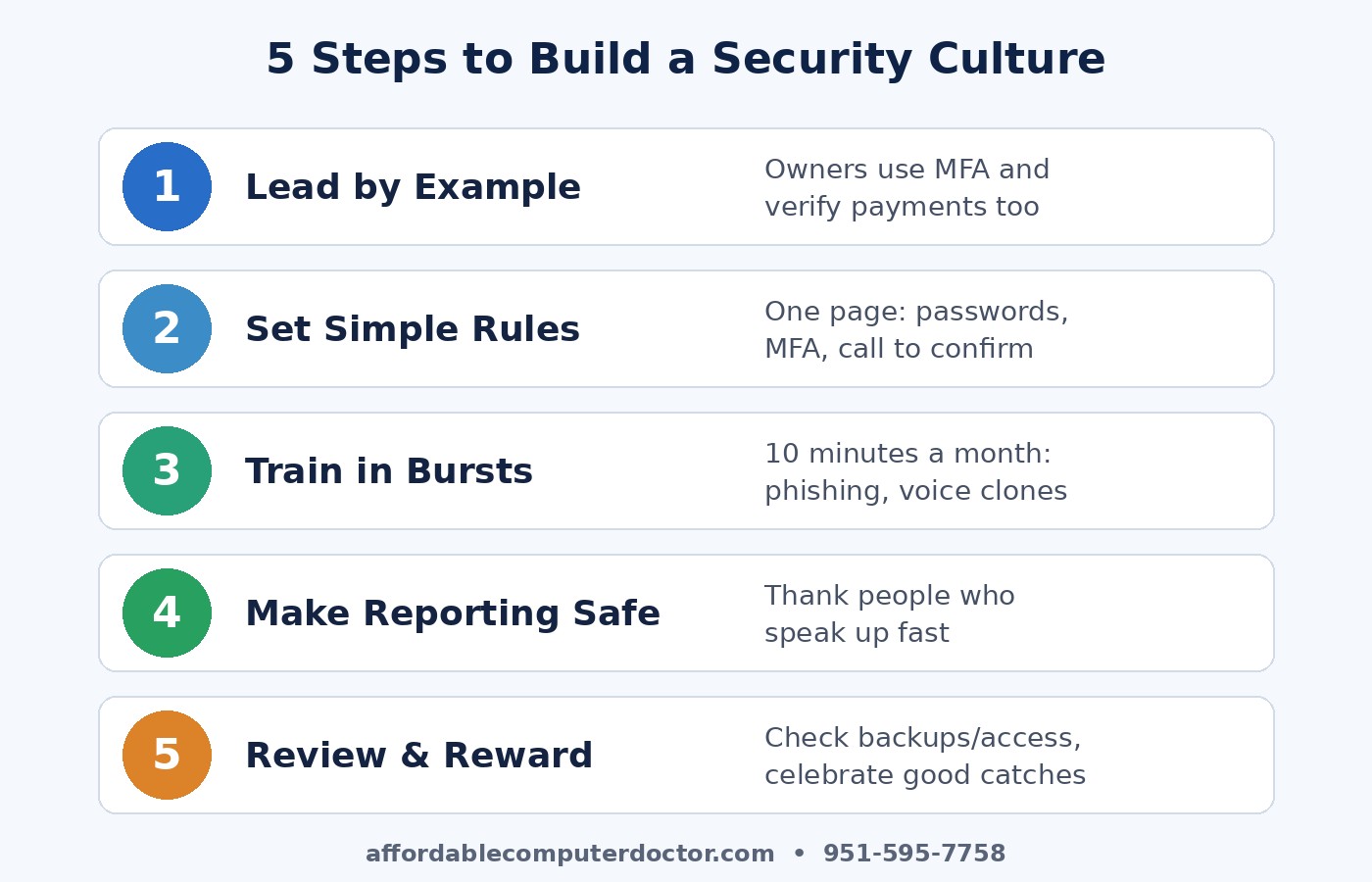
Culture needs structure behind it. Think of it as a simple security program that gives people clear expectations. Here are the five steps we recommend to small businesses in the Temecula Valley:
Culture and tools work together. Good habits are easier when the technology makes the safe choice the easy choice: a password manager everyone can actually use, automatic updates turned on, email filtering, reliable backups with an offline or immutable copy, and computers that still receive security patches. If your office still has machines running Windows 10, which no longer gets free security updates, that’s a gap no amount of training can fully cover. Replacing or upgrading those systems is part of building a culture that takes security seriously.
Families have a culture too. Talk with kids and older relatives about scam calls, fake package-delivery texts and pop-ups that claim your computer is infected. Agree on a family “safe word” to confirm emergencies, since voice cloning makes the classic “grandparent scam” more convincing. Turn on MFA for email and banking, keep devices updated, and back up the photos you can’t replace. These small habits protect a household the same way they protect a business.
You don’t need a security department to build a strong security culture. Pick one rule to introduce this month, such as verifying every payment change by phone, and talk about it with your team. Add another next month. Over time those habits add up to a business that is much harder to trick, and much faster to recover if something does go wrong.
A. Computer Doctor helps small businesses and home users across Murrieta, Temecula, Menifee, Wildomar and Lake Elsinore set up the practical pieces that make good habits easy: password managers, MFA, backups, updates and simple staff awareness tips. If you’d like a friendly, plain-English review of where you stand, call or text (951) 595-7758.
Credit: This article was inspired by the NCX Group podcast episode EP 3 – Creating a Security Culture (October 2017). The analysis and 2026 recommendations are our own.