Inspired by the NCX Group podcast episode EP 5 – Cybersecurity and Nonprofits.
Ask the board of a small charity, church, youth league or PTA in Murrieta or Temecula whether hackers are interested in them, and the most common answer is a polite laugh. “We’re a nonprofit. We don’t have anything worth stealing.” It’s an understandable view, and it’s exactly the view criminals count on. Nonprofit cybersecurity is no longer a niche topic. Organizations that run on donations, volunteers and tight budgets hold donor payment details, member addresses, volunteer background-check records and sometimes health or client information. They also tend to have the weakest defenses in town.
NCX Group raised this point back in 2017, when the Equifax breach was in the headlines and most people assumed only big corporations got hit. Almost a decade later the warning holds up better than ever. Here’s what has changed, why nonprofits are still in the crosshairs in 2026, and the practical steps we recommend to local organizations of every size.
Criminals aren’t picking on nonprofits for the headlines. They do it because the numbers work in their favor:
The threats NCX described in 2017 (phishing, data breaches, sloppy password habits) are still the top problems. But a few things have sharpened them since then:
Federal agencies have noticed too. CISA now publishes free guidance written specifically for civil-society and community organizations with limited resources, a sign of how often these groups are being hit.
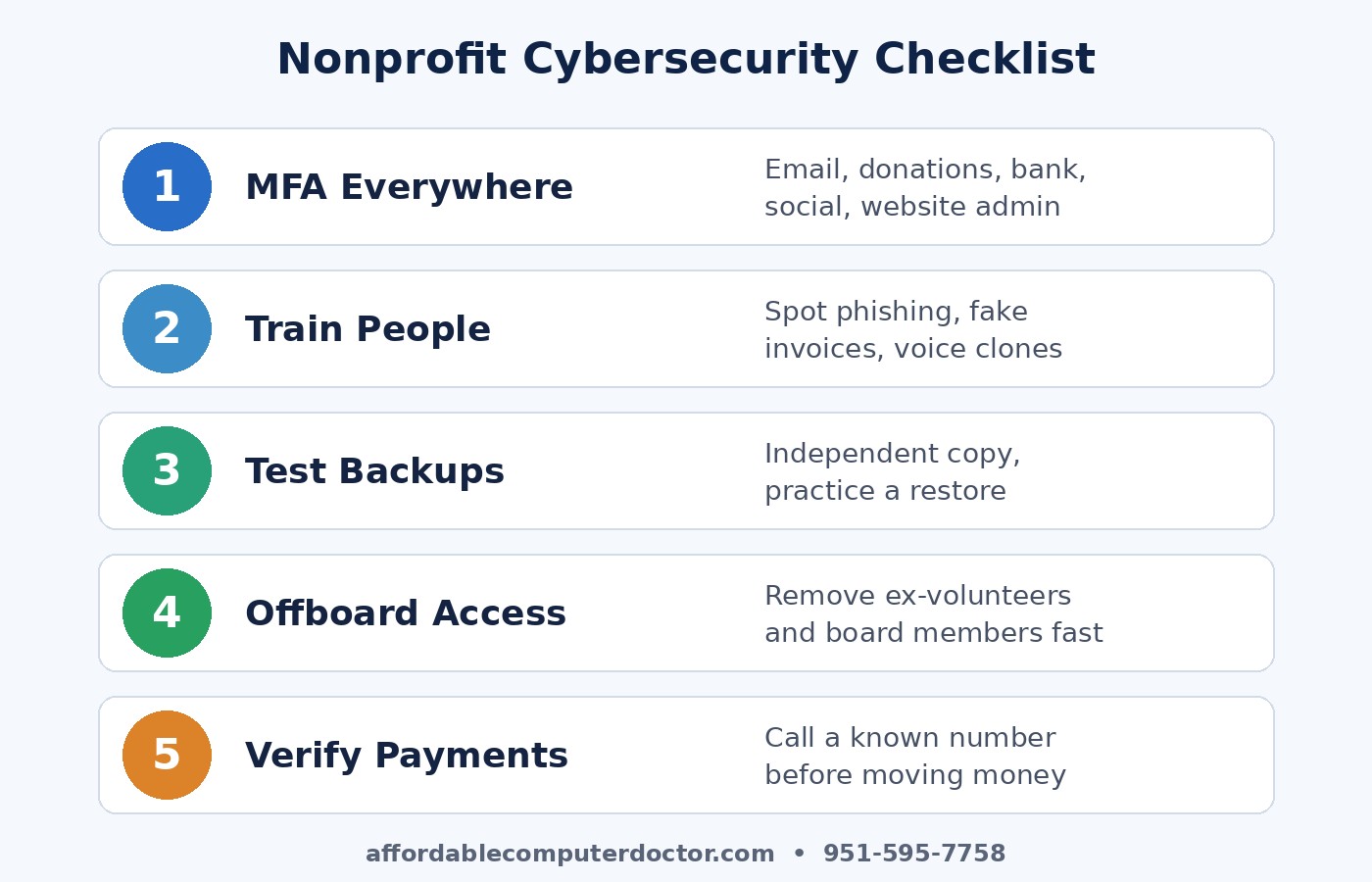
The good news: the most effective protections are inexpensive, and many are free. If your organization does nothing else this year, do these five things.
Email, the donation platform, the bank, the website admin, social media accounts. Multi-factor authentication (MFA) stops the vast majority of account takeovers, even when a password has been stolen. Use an authenticator app rather than text messages when you can, and retire shared logins so every person has their own account.
A 20-minute session at your next volunteer meeting on how to spot phishing, fake invoices and impersonation calls pays for itself many times over. Make it clear that nobody will ever get in trouble for double-checking a suspicious request.
Cloud services aren’t automatically backups. Keep an independent copy of your donor database, financial records and key documents, with at least one copy kept offline or in a separate account. Then actually try restoring a file. A backup you’ve never tested is a hope, not a plan.
Keep a simple list of who has access to what. When someone’s term ends or a volunteer moves on, remove their access the same week. It’s one of the most overlooked gaps we see in local organizations.
Adopt a firm rule: any request to send money, buy gift cards or change bank details gets confirmed with a phone call to a number you already have on file, never one listed in the email. This single habit defeats most business email compromise scams.
Beyond the big five, make sure office computers and volunteer laptops get automatic updates and run supported versions of Windows or macOS. Windows 10 reached end of support in October 2025, so any older machines still running it should be upgraded or replaced. And don’t keep data you don’t need. If you don’t store full card numbers or old volunteer records, they can’t be stolen. Let your payment processor hold card data, and set a schedule for deleting records you no longer need.
Finally, have a short plan for when something goes wrong: who to call, how to lock down accounts, and how you’ll notify donors if their information is exposed. California’s data breach notification law can apply to nonprofits too, so it’s worth knowing your obligations before you need them.
If you volunteer, donate or serve on a board, the same tactics are aimed at you at home. Be wary of “charity” texts and emails after disasters or during the holiday giving season, give through an organization’s official website rather than a link in a message, and use MFA on your own email and bank accounts.
Your mission deserves the same protection as any business. If your charity, church, school group or community organization in Murrieta, Temecula, Menifee, Wildomar or Lake Elsinore would like a second set of eyes on its setup, from MFA and backups to cleaning up old accounts and securing volunteer laptops, A. Computer Doctor is happy to help. Call or text (951) 595-7758 to talk through what makes sense for your budget.
Credit: This article was inspired by the NCX Group podcast episode EP 5 – Cybersecurity and Nonprofits (November 2017). The analysis and 2026 recommendations are our own.