Most business owners picture a cyberattack as something that happens over the internet: a phishing email, a hacked password, ransomware sneaking in through an outdated server. Those threats are real. But some of the easiest breaches I’ve seen in local offices never touched the firewall at all. Someone simply walked in. That’s why physical security for small business deserves a seat right next to antivirus and backups in your security plan. If a stranger can reach your computers, your network closet, or a laptop left on a desk, every dollar you spent on digital protection can be undone in a few minutes.
This guide explains why the front door is part of your cybersecurity, where the usual gaps hide, and the practical, low-cost steps that small offices and households in Murrieta, Temecula, and the surrounding area can take this week.
Your data lives on physical things: desktops, laptops, phones, routers, network switches, USB drives, and often a small server or NAS tucked into a closet. Anyone who can touch those devices has options an online attacker would love to have. They can plug a malicious USB stick into an unlocked PC, attach a tiny wireless device to an open network port, walk out with a laptop, or photograph a password written on a sticky note. None of that shows up in a firewall log.
Security professionals who run authorized “walk-in” tests often say the same thing: confident body language, a clipboard, a delivery box, or a vendor polo shirt gets them much further than any hacking tool. Friendly staff hold the door. Busy receptionists assume the visitor belongs to someone. In a small business, where everyone trusts everyone, that kindness is exactly what an intruder counts on.
After years of on-site IT work across southwest Riverside County, these are the issues that come up again and again:
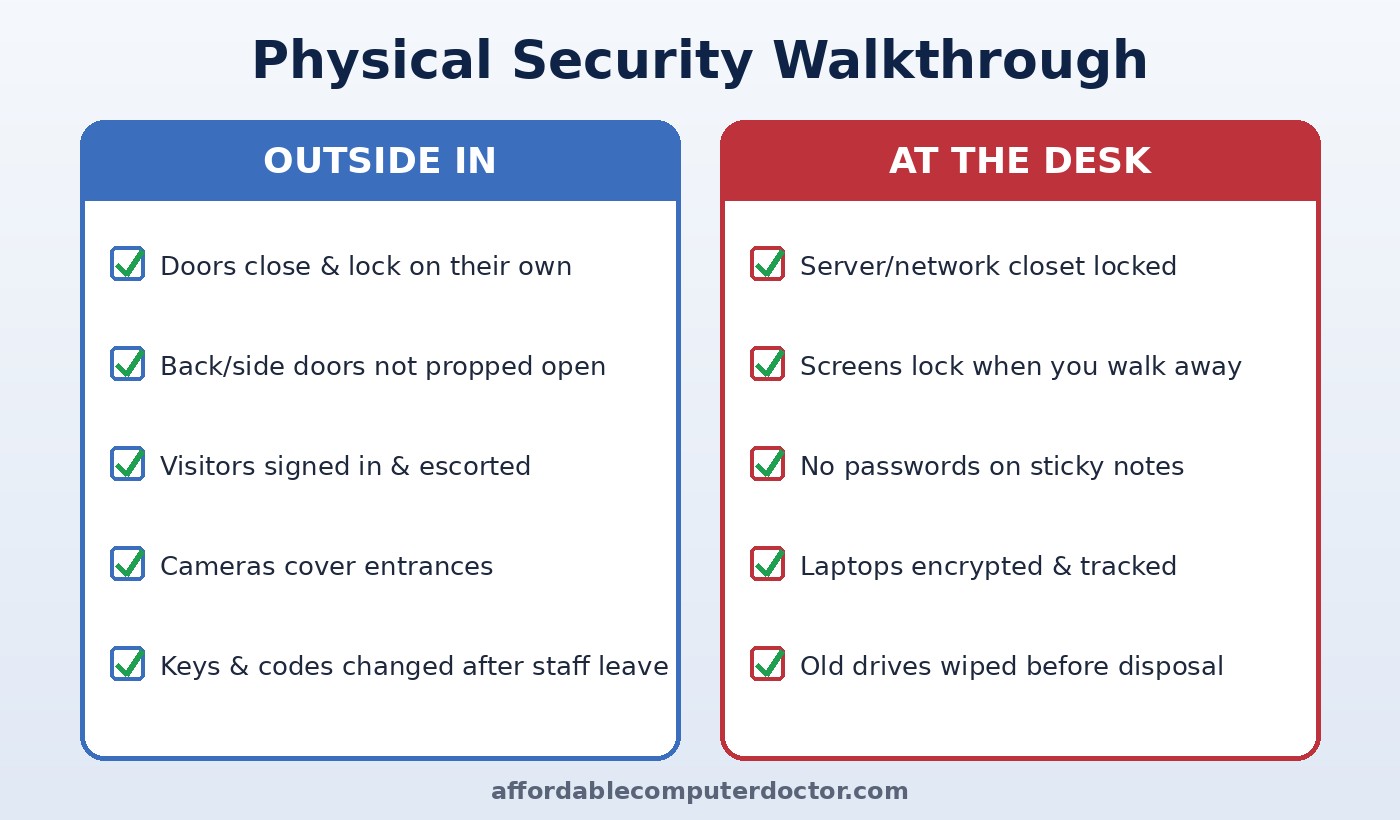
You don’t need a corporate security team or a big budget. Start with a 30-minute walkthrough and fix what you find.
Make sure exterior doors close and latch on their own. Install inexpensive door alarms or chimes on back entrances. If you use keypad codes, give each person their own code where possible and change shared codes whenever someone leaves. Keep a simple list of who has keys, fobs, and codes, and review it every quarter.
A sign-in sheet or tablet, a visitor badge, and a rule that guests are escorted beyond the lobby will stop most casual intrusions. Teach staff that it is polite, not rude, to ask “Who are you here to see?” and to confirm unexpected vendors with a quick phone call to the company using a number you already have, not one the visitor gives you.
Your modem, router, switches, and any server or backup drive should live behind a locked door or in a locking cabinet. Disable or unplug unused wall network jacks in lobbies and conference rooms. Put guest Wi-Fi on a separate network so visitors never share a connection with your business computers or point-of-sale system.
Set screens to lock automatically after a few minutes, and teach the Windows + L habit for locking a PC instantly. Turn on full-disk encryption (BitLocker on Windows, FileVault on Mac) so a stolen laptop is just a lost piece of hardware rather than a data breach. Enable “Find My Device” tracking. Replace sticky-note passwords with a password manager.
Modern cameras are affordable, but install them carefully: change default passwords, keep the firmware updated, and keep them on their own network segment. A poorly configured camera can become an entry point for attackers instead of a deterrent.
Before you donate, sell, or recycle a computer, copier, or phone, wipe or physically destroy the storage. Office copiers and printers often keep copies of scanned documents on an internal drive, which surprises a lot of owners.
Plenty of Temecula Valley professionals now work from home at least part of the week, and the same ideas apply. Keep work laptops out of sight in parked cars, lock your screen when family or guests are around, put the router somewhere it can’t be reset or tampered with by visitors, and store backup drives in a safe place, ideally with a second copy kept off-site or in the cloud. A burglary or a curious houseguest shouldn’t turn into a client data problem.
Locks and cameras help, but people make the real difference. A short, friendly conversation at your next staff meeting covering tailgating, unknown USB drives, unexpected “technicians,” and screen locking pays for itself. Consider a quick practice scenario: have a trusted friend show up unannounced as a “vendor” and see how far they get. The goal isn’t to embarrass anyone. It’s to show how easily good manners can be used against you, and to make challenging strangers a normal part of your workplace culture.
The strongest security programs treat the building, the devices, and the network as one system. Multi-factor authentication, patching, and good backups protect you online. Locked closets, visitor rules, and encrypted laptops protect you in person. Leave either side open and an attacker will happily use it.
Want a second set of eyes on your office or home setup? A. Computer Doctor helps small businesses and homeowners in Murrieta, Temecula, Menifee, Wildomar, and Lake Elsinore lock down network equipment, encrypt laptops, set up secure guest Wi-Fi, and safely wipe old devices, all explained in plain English with no pressure. Call or text 951-595-7758 to schedule a security checkup.
Inspired by the NCX Group podcast episode “EP 13: Cybersecurity Starts at the Door” (Bite Size Security). Our take is written independently for local small businesses and home users.